Creating a productive home office setup is essential for anyone working remotely or spending significant time on personal projects. A well-organized and comfortable workspace helps maintain focus, reduces distractions, and improves overall work quality. Whether you have a dedicated room or just a small corner, these tips will help you optimize your home office for maximum productivity.
Choose the Right Location
Selecting the right spot for your home office is the first step. Here are some factors to consider:
– Quiet space: Pick a location with minimal noise and foot traffic to avoid interruptions.
– Natural light: Position your desk near a window if possible. Natural light improves mood and reduces eye strain.
– Privacy: If you share your living space, choose an area where you can close a door or use partitions to create boundaries.
– Comfortable temperature: Make sure the space is well-ventilated and maintains a comfortable temperature year-round.
Invest in Ergonomic Furniture
A comfortable and supportive workspace prevents physical strain and helps you stay focused longer.
– Ergonomic chair: Choose a chair with adjustable height, lumbar support, and comfortable cushioning.
– Desk height: Your desk should allow you to keep your wrists straight and your forearms parallel to the floor.
– Monitor position: Place your screen at eye level, about an arm’s length away, to reduce neck and eye strain.
– Footrest: If your feet don’t rest flat on the floor, use a footrest to maintain good posture.
Organize Your Workspace
Clutter can distract and slow you down, so keeping your office organized is crucial.
– Use storage solutions: Shelves, filing cabinets, and desk organizers keep supplies accessible but out of sight.
– Cable management: Use clips, ties, or cable covers to prevent tangled cords and keep your desk tidy.
– Minimal decor: Decorate with a few items that inspire you but avoid overcrowding the space.
– Daily cleanup: Spend a few minutes at the end of each day clearing your desk to start fresh tomorrow.
Optimize Lighting
Proper lighting reduces eye strain and improves alertness throughout the day.
– Layer your lighting: Combine natural light, overhead lights, and task lamps for balanced illumination.
– Adjust screen brightness: Match your screen brightness to ambient lighting to avoid glare.
– Use warm light for focus: Opt for warm white bulbs (around 2700-3000K) that provide a cozy but focused atmosphere.
Minimize Distractions
A distraction-free environment helps maintain concentration and boosts productivity.
– Set boundaries: Communicate your work hours to household members or roommates.
– Turn off notifications: Silence non-essential alerts on your phone and computer.
– Use noise-canceling headphones: If noise is unavoidable, they help block distractions.
– Limit personal items: Keep your workspace specifically for work to create a mental distinction.
Incorporate Technology Wisely
Having the right technology makes your workflow smoother and faster.
– Reliable internet: A strong Wi-Fi connection or wired ethernet is essential for video calls and file sharing.
– Multiple monitors: If your work requires multitasking, extra screens increase efficiency.
– Keyboard and mouse: Choose devices that are comfortable and reduce wrist strain.
– Software tools: Use apps for task management, communication, and note-taking to stay organized.
Create a Routine
Your physical space is important, but so is your daily schedule.
– Set work hours: Try to start and end your day at consistent times.
– Take breaks: Use techniques like the Pomodoro method (25 minutes working, 5 minutes break) to maintain energy.
– Dress for work: Even if you’re home, dressing purposefully can help your mindset shift into work mode.
– Exercise regularly: Stretch or walk during breaks to refresh both body and mind.
Personalize to Stay Motivated
Adding personal touches helps make your home office inviting and motivating.
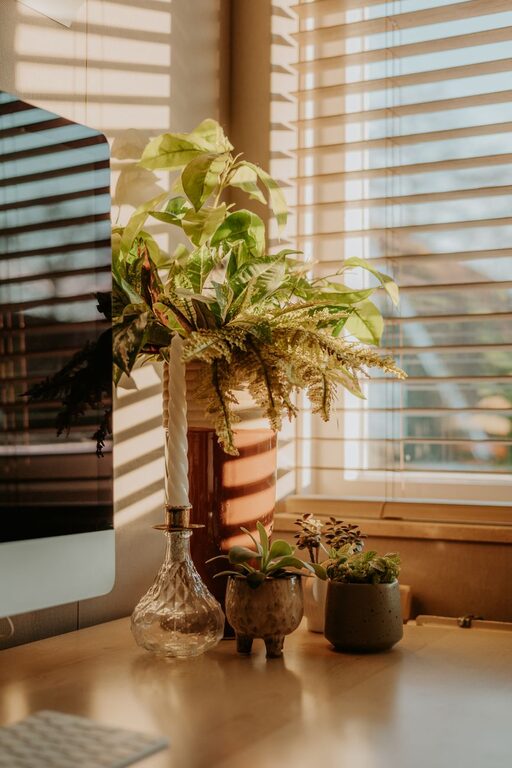
– Plants: Indoor plants improve air quality and add a touch of nature.
– Inspirational items: Photos, quotes, or artwork that encourage creativity and positivity.
– Comfort items: A cozy blanket, a favorite mug, or soothing scents can make your workspace pleasant.
—
Designing a productive home office setup is about balancing comfort, organization, and functionality. By choosing the right location, investing in ergonomic furniture, controlling distractions, and establishing routines, you’ll create a workspace that supports your best work every day. Remember, small changes can make a big difference – so start with one tip and build from there!